Brivis Evaporative Cooling Controller Manual: A Comprehensive Guide

Brivis offers flexible controllers for simple, whole-house air conditioning control, encompassing Evaporative Cooling and Brivis ICE systems. This guide details operation and troubleshooting.
Understanding Brivis Evaporative Cooling Systems
Brivis evaporative cooling, often integrated as Brivis ICE (Integrated Cooling Equipment), presents a refreshing alternative to traditional refrigeration-based air conditioning. These systems leverage the natural cooling process of water evaporation to lower air temperatures, offering an energy-efficient solution, particularly in drier climates.
Unlike systems that use refrigerants, evaporative coolers draw in warm, dry air and pass it through moistened cooling pads. As water evaporates, it absorbs heat from the air, resulting in a noticeable temperature drop. This cooled, humidified air is then circulated throughout your home via existing ductwork, often complementing a Brivis Gas Ducted Heating system.
Understanding the interplay between the controller, cooling pads (like FILCEL Contour L50), and the main control box (N-E6B) is crucial for optimal performance. The controller manages the fan and pump, initiating the cooling cycle and responding to your desired temperature settings. Proper maintenance, including pad replacement, ensures continued efficiency.
What is Brivis ICE (Integrated Cooling Equipment)?
Brivis ICE represents a sophisticated integration of evaporative cooling technology with existing Brivis gas ducted heating systems. It’s designed to provide year-round climate control, seamlessly transitioning between heating and cooling modes. This add-on solution utilizes your existing ductwork, minimizing installation complexities and costs compared to installing a separate refrigerated system.
The core benefit of ICE lies in its ability to deliver both warm and cool air through the same outlets, managed by a central controller. This controller, whether a Manual, Networker, or Promina model, dictates the operational mode – heating, cooling, or automatic switching. The system’s efficiency is enhanced by features like the pre-wet cycle, preparing the cooling pads for optimal performance.
ICE systems are compatible with various Brivis models (AC, AD, CC) and rely on components like the control board (item number 161810921488) for seamless operation. Understanding ICE means recognizing its holistic approach to home comfort.
Brivis Controller Types: An Overview
Brivis offers a range of controllers designed for user-friendly operation of their evaporative cooling and integrated ICE systems. These controllers provide varying levels of control and connectivity, catering to different user preferences and system complexities.
Manual Controllers offer basic on/off functionality for both the fan and pump, providing direct control over the cooling process. Networker Controllers introduce connectivity, allowing for remote control and potentially integration with smart home systems. The Promina Controller represents an advanced option, featuring automatic operation and intelligent climate management.
Compatibility is key; the NE-1 controller works with both Manual (TEK 485) and Networker wall controls. Choosing the right controller depends on your desired level of automation and control. All controllers aim to simplify managing your home’s climate, ensuring comfort and efficiency.
Manual Controllers: Features and Operation
Brivis Manual Controllers provide straightforward, direct control over your evaporative cooling system. These controllers are characterized by their simplicity, offering essential functionality without complex programming or connectivity features. The primary function is to independently operate the fan and pump components of the cooler.
Operation is intuitive: users can turn the fan on or off to circulate air, and activate the pump to wet the cooling pads. This manual control allows for precise adjustment based on immediate comfort needs and environmental conditions. They are ideal for users who prefer a hands-on approach to climate control.
These controllers are compatible with AC, AD, and CC models. They offer a reliable and uncomplicated way to manage your cooling, providing a basic yet effective solution for maintaining a comfortable indoor environment.
Turning On/Off Fan and Pump with Manual Controllers
Brivis Manual Controllers feature dedicated controls for the fan and pump, allowing independent operation. To activate the fan, simply toggle the fan switch to the “on” position; this initiates air circulation without wetting the cooling pads. Conversely, engaging the pump switch activates the water supply, saturating the cooling pads for evaporative cooling.
For optimal cooling, both the fan and pump should be operated simultaneously. However, the manual controller allows for flexibility – the fan can be used for air circulation even when cooling isn’t required, and the pump can be briefly activated to re-wet the pads as needed.
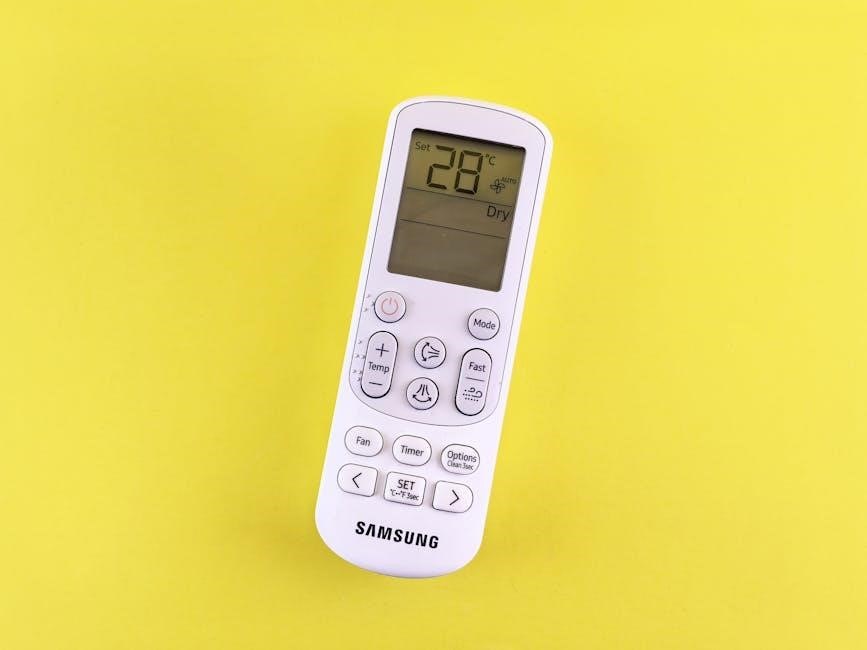
Remember that manual controllers require user intervention for each adjustment. There are no automated settings or pre-programmed schedules. This direct control provides a simple and responsive way to manage your evaporative cooling system.
Networker Controllers: Connectivity and Control
Brivis Networker Controllers represent a step up in functionality, offering enhanced connectivity and control compared to manual models. These controllers are compatible with both Manual (TEK 485) and Networker wall controls, providing versatile integration options within your home’s cooling system.
Networker controllers facilitate remote operation and monitoring, allowing users to adjust settings from various locations. This connectivity enables convenient control over fan speed, pump activation, and potentially other features depending on the specific model. They often integrate with smart home systems for automated scheduling and control.
The NE-1 controller is a key component, supporting communication between the cooler and the wall-mounted control units. Proper wiring and configuration are essential for seamless operation. Refer to the installation guide for detailed instructions on establishing network connectivity.
Auto Mode Functionality and Pre-Wet Feature
Brivis evaporative coolers, particularly those utilizing Networker and Promina controllers, feature an Auto mode designed for optimal comfort and efficiency. This mode automatically adjusts fan speed and pump operation based on ambient temperature. A crucial component of Auto mode is the “Pre-Wet” function, which prepares the cooling pads for effective evaporation.
The Pre-Wet cycle initiates before the fan starts, saturating the Filcel cooling pads with water. This ensures immediate cooling upon fan activation. However, Pre-Wet doesn’t always occur; certain conditions prevent its activation, such as manual operation or when the cooler isn’t calling for cooling.
Understanding when Pre-Wet will and won’t function is vital for troubleshooting. The Promina controller automatically manages this process, while manual overrides can disable it.
Understanding the Pre-Wet Cycle
The Pre-Wet cycle is a key feature of Brivis evaporative coolers operating in Auto mode, designed to maximize cooling efficiency. Before the fan activates, the pump runs briefly to thoroughly saturate the Filcel cooling pads with water. This pre-soaking process is critical because dry pads significantly reduce cooling performance.
During the Pre-Wet phase, only the pump operates; the fan remains off. This allows the pads to absorb water without immediately blowing air through them. The duration of the Pre-Wet cycle is automatically managed by the controller, ensuring optimal pad saturation without excessive water usage.
A successful Pre-Wet cycle results in immediate and effective cooling when the fan subsequently engages. It’s a proactive step that prepares the system for peak performance, contributing to a more comfortable indoor environment.
Situations Where Pre-Wet Does Not Occur

Several scenarios can prevent the Pre-Wet cycle from initiating on a Brivis evaporative cooler. If the controller is set to manual operation, bypassing the Auto mode, the Pre-Wet function will not activate, as the user directly controls fan and pump operation.
Additionally, if the cooler has recently been running and the pads are already saturated, the controller may skip the Pre-Wet cycle to conserve water. The system intelligently assesses pad moisture levels.
Furthermore, a low water level in the reservoir will inhibit the Pre-Wet cycle, protecting the pump from running dry. Finally, certain models operating similarly to Brivis Networker and Manual controls also won’t engage Pre-Wet.
Brivis Promina Controller: Automatic Operation
The Brivis Promina controller excels in automatic operation, providing convenient and efficient cooling. When set to Auto, the controller monitors indoor temperatures and adjusts cooling accordingly, initiating the fan and pump as needed. Once the desired temperature is reached, the Brivis Promina automatically ceases cooling, maintaining a comfortable environment.
Importantly, the Promina controller features a Pre-Wet cycle, saturating the cooling pads before full operation for optimal performance. When cooling is no longer required, the controller automatically runs a brief cycle to help maintain pad cleanliness.
This intelligent automation simplifies climate control, eliminating the need for constant manual adjustments and ensuring consistent comfort throughout your home. The Promina controller is designed for ease of use and reliable performance.
Troubleshooting Common Controller Issues
Brivis evaporative cooling controller problems can often be resolved with simple checks. If the controller isn’t responding, verify the power supply and wiring connections. A lack of response might indicate a faulty control board (item number 161810921488) requiring replacement.
If the Pre-Wet function isn’t operating, ensure the system isn’t in manual mode, as Pre-Wet doesn’t occur with manual operation. Check for obstructions in the water supply line to the cooling pads. For networker or manual controllers, confirm compatibility with your Brivis model (AC, AD, or CC).
If issues persist, consult the Brivis controller downloads and resources online for detailed troubleshooting guides. Remember safety precautions when working with electrical components.
Identifying Brivis Evaporative Cooler Models
Correctly identifying your Brivis evaporative cooler model is crucial for controller compatibility. Brivis categorizes coolers into AC, AD, and CC models, each potentially requiring specific controller types. The NE-1 controller, for example, is designed to work with Manual (TEK 485) and Networker wall controls across these models.
Understanding your model ensures you select the appropriate replacement controller or parts. Refer to the unit’s nameplate, typically located on the main control box (N-E6B), for this information. This plate will clearly state the model designation (AC, AD, or CC) and other relevant details.
Incorrect controller selection can lead to functionality issues. Always verify compatibility before purchasing a new controller or control board.
AC, AD, and CC Models Compatibility
Brivis evaporative coolers are broadly categorized into AC, AD, and CC models, impacting controller compatibility. The NE-1 controller demonstrates broad compatibility, functioning effectively with both Manual (TEK 485) and Networker wall controls across all three model types – AC, AD, and CC.
However, it’s vital to confirm specific controller requirements based on your cooler’s age and features. While the NE-1 offers versatile support, older models might necessitate different controllers. Always cross-reference the controller model number with your cooler’s documentation or the Brivis website.
Proper identification of your AC, AD, or CC model is the first step towards ensuring seamless integration and optimal performance of your cooling system; Incorrect matching can lead to operational issues.
Controller Model Numbers and Compatibility (NE-1)
The Brivis NE-1 controller stands out as a versatile option, designed for compatibility with a wide range of Brivis evaporative cooling systems. Specifically, the NE-1 seamlessly integrates with both Manual (identified as TEK 485) and Networker wall control models. This broad compatibility simplifies upgrades and replacements.
The NE-1’s adaptability extends across various Brivis cooler models, including the AC, AD, and CC series, offering a unified control solution. Part number B014550 designates this crucial component. When selecting a replacement, verifying the NE-1’s suitability for your specific cooler model is paramount.
Ensure the controller’s features align with your desired level of control, whether basic on/off functionality or advanced network connectivity. Proper model number verification guarantees optimal performance.
Brivis Control Board: Key Component
The Brivis control board serves as the central nervous system of your evaporative cooling system, orchestrating the operation of all connected components. It receives signals from the controller and translates them into actions for the fan, pump, and other vital parts. This board is critical for reliable and efficient cooling.
A key identifier for this component is its item number: 161810921488. This number is essential when ordering a replacement board, ensuring compatibility with your specific Brivis model. The board’s functionality directly impacts the overall performance of the cooling system.
Proper functioning of the control board is vital for features like automatic operation and pre-wet cycles. Regular inspection and timely replacement of a faulty board are crucial for maintaining optimal cooling performance and preventing system failures.
Control Board Item Number: 161810921488
When sourcing a replacement Brivis control board, referencing the precise item number – 161810921488 – is paramount. This unique identifier guarantees compatibility with your existing Brivis evaporative cooling system, preventing potential operational issues arising from mismatched components. Utilizing this number streamlines the ordering process, ensuring you receive the correct part.
The control board, bearing this item number, is a crucial element in managing the fan, pump, and overall cooling functionality. It’s a Brand-specific part, manufactured by BRIVIS, and is currently available as a new item with multiple units in stock.
Always verify this item number before purchase to avoid delays and ensure a seamless replacement. Accurate identification is key to restoring your evaporative cooler to optimal performance.
Filcel Cooling Pads: Model Contour L50
Filcel cooling pads, specifically the Model Contour L50, are a vital component in the efficiency of your Brivis evaporative cooler. These pads are designed to maximize water absorption and airflow, directly impacting the cooling performance of your system. Regular inspection and replacement of these pads are essential for maintaining optimal cooling capacity.
The Contour L50 pads are engineered to provide a large surface area for evaporation, drawing heat from the air as it passes through. This process delivers cool, refreshing air throughout your home. Worn or damaged pads reduce airflow and cooling effectiveness.
Ensure you use genuine Brivis replacement pads to guarantee compatibility and performance. Maintaining clean and efficient cooling pads contributes significantly to the overall health and longevity of your evaporative cooling system.
Brivis Evaporative Cooler Main Control Box (N-E6B)
The Brivis Evaporative Cooler Main Control Box (N-E6B) is the central hub for operating your cooling system. This component manages the fan, pump, and other essential functions, responding to signals from your chosen controller – whether it’s a manual, networker, or Promina model.
A critical consideration regarding the N-E6B is the potential absence of an isolation switch. This means a separate isolation switch may be required to safely disconnect power to the unit for maintenance or emergencies. Always verify your installation complies with electrical safety standards.

Proper functioning of the N-E6B is crucial for reliable operation. If you experience issues with your cooler, inspecting the control box and its connections is a key troubleshooting step. Ensure all wiring is secure and undamaged.
No Isolation Switch Considerations
Many Brivis Evaporative Cooler installations, specifically those utilizing the N-E6B Main Control Box, may not include a dedicated isolation switch. This presents a vital safety consideration for anyone performing maintenance, repairs, or inspections on the unit.
Without an isolation switch, disconnecting power requires accessing the circuit breaker, which can be inconvenient and potentially hazardous. It’s strongly recommended to have a qualified electrician install a readily accessible isolation switch near the evaporative cooler.
This switch allows for a complete and safe power disconnect, protecting both the user and the equipment. Always verify the presence – or absence – of an isolation switch before commencing any work on the cooler. Prioritize electrical safety at all times.
Controller Installation and Wiring
Proper Brivis controller installation and wiring are crucial for optimal performance and safety. Ensure the power supply to the cooler is completely disconnected at the circuit breaker before beginning any wiring work. The NE-1 controller, compatible with both Manual (TEK 485) and Networker wall controls, requires careful connection.
Refer to the specific wiring diagram included with your controller model. Typically, wiring involves connecting power, fan control, pump control, and communication lines. Incorrect wiring can damage the controller or the cooler.
Double-check all connections before restoring power. If you are uncomfortable with electrical work, consult a qualified electrician. Securely mount the controller to the wall, ensuring it is easily accessible and protected from the elements.
Safety Precautions When Working with Controllers
Safety is paramount when working with Brivis evaporative cooling controllers. Always disconnect the power supply to the cooler at the circuit breaker before commencing any installation, wiring, or maintenance. Never work with electrical components in wet or damp conditions.
If your cooler has no isolation switch, exercise extreme caution. Ensure the main power supply is switched off and locked out to prevent accidental activation. Use insulated tools and wear appropriate personal protective equipment, including safety glasses and gloves.
Incorrect wiring can create a fire hazard or damage the controller and cooler. If you are unsure about any aspect of the installation or wiring, consult a qualified electrician. Do not attempt repairs beyond your skill level.
Finding Replacement Controllers and Parts
Locating replacement Brivis controllers and parts is crucial for maintaining your system. Begin by identifying your specific cooler model (AC, AD, or CC) and the existing controller model number (like NE-1). Online marketplaces often list Brivis parts, including the control board (item number 161810921488) and Filcel cooling pads (Contour L50).
Authorized Brivis dealers are excellent resources for genuine parts and expert advice. They can assist with compatibility checks, ensuring you purchase the correct components for your system. Check the Brivis website for a dealer locator.

When searching, be precise with part numbers to avoid incorrect purchases. Consider the condition – new or used – and compare prices from different suppliers. Remember to prioritize safety and quality when selecting replacement parts.
Brivis Controller Downloads and Resources
Brivis provides a range of downloadable resources to support your evaporative cooling system. Access the official Brivis website to find comprehensive brochures, including the Brivis Gas Ducted Heating Brochure, which often contains relevant controller information. Look for specific documentation related to your controller type – Manual, Networker, or Promina.
The website’s “Downloads” section is a central hub for manuals, installation guides, and wiring diagrams. These resources are invaluable for troubleshooting common issues and understanding system operation. You can also find information on Brivis ICE (Integrated Cooling Equipment) add-ons.
Furthermore, explore online forums and communities dedicated to Brivis products, where users share experiences and solutions. These platforms can offer practical insights and assistance beyond the official documentation.

Maintaining Your Brivis Evaporative Cooling Controller
Regular maintenance of your Brivis evaporative cooling controller ensures optimal performance and longevity. Periodically inspect the controller face for dust and debris, cleaning gently with a soft, dry cloth. Avoid using liquids or abrasive cleaners, as these can damage the controls. Check wiring connections within the main control box (N-E6B) for tightness and corrosion, especially if you have a system with no isolation switch.
Ensure the controller display is functioning correctly, and all buttons respond as expected. Familiarize yourself with the controller’s features, such as Auto mode and the Pre-Wet function, to maximize efficiency. If you encounter issues, consult the Brivis documentation or seek assistance from a qualified technician.
Remember to keep the controller software updated, if applicable, to benefit from the latest features and bug fixes.
